Controls & Calculator Guide: Mastering the Cash Drawer & Shelf
Survival during your midnight shift depends heavily on quick service and sharp attention. Master every mouse interaction, learn how to hold right-click to check prices, and calculate Peso change without making costly errors.
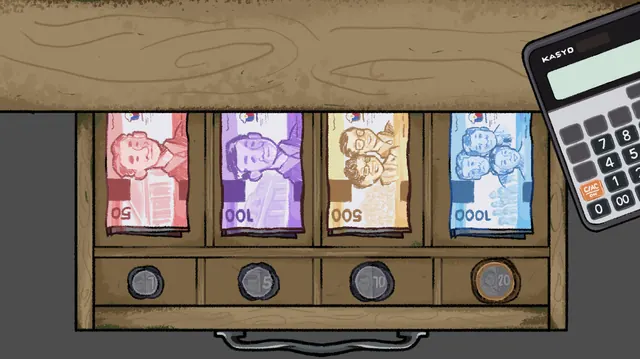
In Narinig Mo Ba?, controls are centered on intuitive mouse interactions: Left Click to pick up or hand over goods, Hold Right Click over any shelf product to inspect its official price tag, and Hold Left Click to return misclicked items to the shelf. Giving change is done by clicking the desk's solar calculator to compute subtraction, then selecting coins (₱1, ₱5, ₱10, ₱20) and bills (₱50 to ₱1,000) inside the cash drawer.
1. Complete Mouse Control Reference Table
The controls designed by VC Studios are streamlined yet tactile. Here is the full breakdown of inputs and behaviors:
| Input Action | In-Game Effect | Context / Usage |
|---|---|---|
| Edge Screen Panning | Shifts camera perspective | Between the shelf view and counter window |
| Single Left Click | Grab or place merchandise | On hanging sachets, drinks, or counter space |
| Hold Right Click | Displays product price tag | While hovering over any store item |
| Hold Left Click | Safely returns item to shelf | When an incorrect product was grabbed |
| Click Cash Drawer / Coins | Opens drawer & counts money | Located directly beneath the wooden counter |
2. How to Inspect Product Prices (Hold Right Click)
A common pitfall for new players is guessing product costs and undercharging or overcharging customers.
Real-world sari-sari stores feature dozens of hanging single-use sachets (coffee, 3-in-1 mixes, shampoo, garlic chips, sardines). To prevent confusion, you can inspect any item at any time:
- Hover your mouse directly over the item on the shelf or in your hand.
- Press and hold Right Click.
- An in-game indicator will display the item name and official price in Philippine Peso (₱).
- Release the right-click button once confirmed.
3. Cash Drawer Currency System
The wooden drawer mechanism accurately reflects Filipino cash management:
🪙 Coins (Barya)
Used for small purchases such as candies or instant coffee:
💵 Banknotes (Papel)
Used when customers pay with large bills:
⚡ Cashier Pro Tip: Always double-check your subtraction with the solar calculator on the counter before handing over coins. Giving the exact change on the first try keeps customer temperament calm during tense night encounters.
Ready to test your cashier skills?
Play Narinig Mo Ba? free in your browser and master the store routine.