Day 1 Walkthrough: Complete Shift Guide from Junjun to Midnight
Starting your shift at the sari-sari store seems quiet and cozy at first. Here is your definitive, step-by-step walkthrough covering customer interactions, shelf navigation, and surviving the eerie midnight hours.
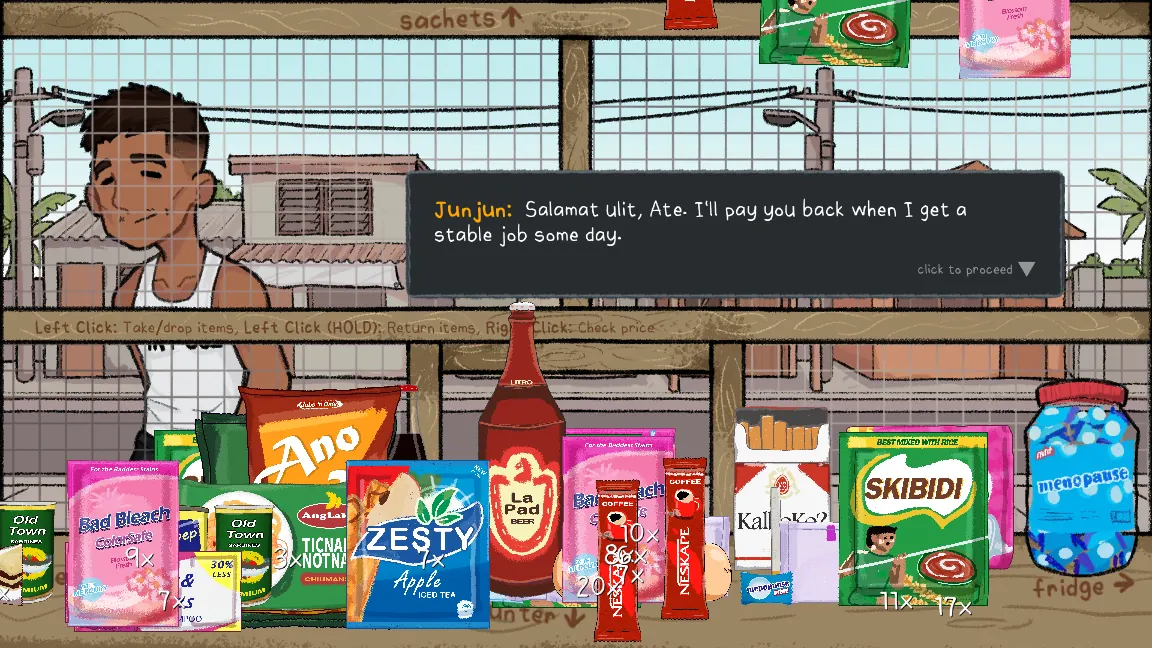
In Day 1 of Narinig Mo Ba?, your first customer is young Junjun asking for a stick of coffee. Move your mouse to the left screen edge to view the hanging shelf sachets, left-click the coffee stick, move back to the counter, and hold Right Click to verify its price tag. Serve the item, then calculate the change using the cash drawer and solar calculator before listening to Mare's unsettling neighborhood rumors.
1. Starting Your Store Shift
When the game launches, you take the perspective of a lone storekeeper inside an authentic Filipino sari-sari store. Ahead of you is a wooden counter with iron security grilles, a cash drawer beneath, and a small solar-powered calculator.
Important gameplay tip: Do not click rapidly through dialogues. Narinig Mo Ba? is a story-rich psychological horror experience where subtle sound cues and off-hand remarks provide crucial narrative hints.
2. Junjun's Order: The Coffee Stick
Shortly after opening, you will hear a gentle knock at the wooden window. You meet Junjun, an errand boy from the neighborhood asking politely for coffee.
Follow these exact steps to complete Junjun's order:
- Move your mouse cursor to the left border of the screen to transition your camera toward the merchandise shelf.
- Identify the hanging coffee sachets among the snacks and laundry detergents.
- Left Click to pick up the single stick of coffee.
- Move your cursor to the right border to return to the counter view.
- Hold Right Click over the item to double check its official price tag.
- Left Click near Junjun's outstretched hands to serve the coffee.
💡 Returning Misplaced Items: If you accidentally grab the wrong item (e.g. instant noodles or soap), press and hold Left Click to return the item back to the shelf cleanly without angering the customer.
3. Operating the Cash Drawer & Calculator
Once Junjun receives his coffee, he places Philippine Peso currency on the counter. Here begins the shopkeeping arithmetic:
- Examine the customer's cash payment on the counter.
- Click the solar calculator on your desk to compute change (Payment received - item price).
- Open the wooden cash drawer below the counter.
- Select the required coins (₱1, ₱5, ₱10, ₱20) and bills (₱50, ₱100, ₱500, ₱1,000) to match the exact change.
- Hand the change to Junjun.
Junjun thanks you softly ("Salamat ulit, Ate...") before disappearing into the shadowy alleyway. Notice the eerie silence on the street as he leaves.
4. Mare's Gossip & Midnight Dread
After Junjun departs, another neighborhood resident arrives: Mare, known throughout the barangay for her endless stream of gossip.
Here you will be presented with branching dialogue options. Read each line attentively. Her questions regarding recent local tragedies and the iconic phrase "Narinig mo ba?" (Did you hear that?) gradually pull back the curtain on the true mystery.
Survival rule: Keep your answers level-headed and always listen for ambient audio shifts — especially the sudden silencing of outdoor crickets or gravel footsteps.
Ready to test your shopkeeper instincts?
Play the full browser edition of Narinig Mo Ba? instantly with no downloads required.